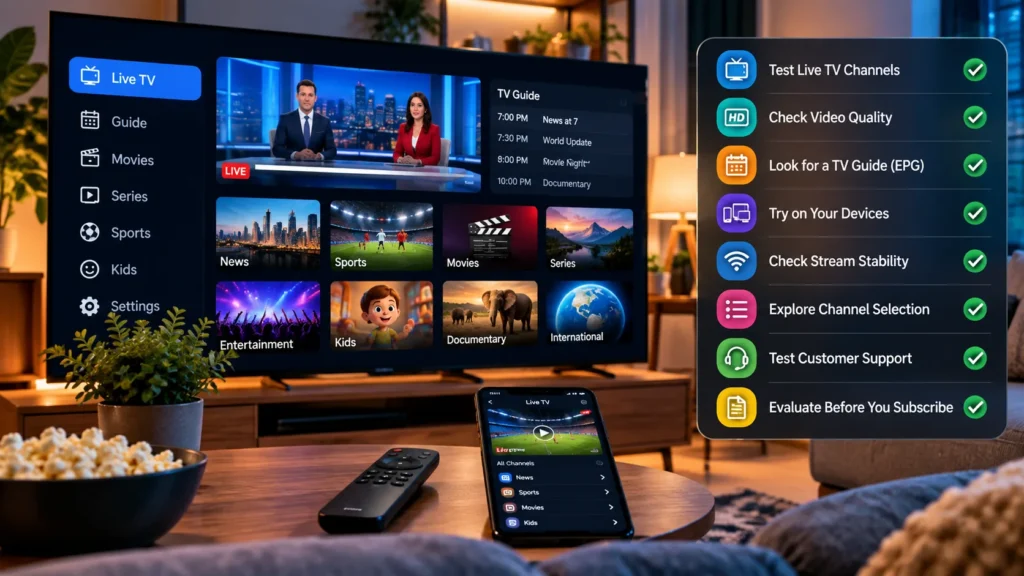
An IPTV free trial can tell you more than a page full of channel counts and picture-quality promises—provided you know what to test. If you only open one channel for five minutes, you may miss the problems that show up when you switch devices, look for a local station, or try to watch at the time you normally use your TV.
This guide gives you eight practical checks and a simple testing plan. It is written for viewers in the United States who want to compare compatible, authorized streaming services without buying a long subscription first. You’ll learn what a short trial can prove, what it cannot, and how to avoid confusing an IPTV player with the service that supplies your channels.
If you’re considering Zelyvon TV, visit the Zelyvon TV homepage to check the current trial offer and request instructions from the team. Confirm the available trial duration, eligibility, access details, and terms before starting.
What Is an IPTV Free Trial?
An IPTV free trial is temporary access offered so you can assess a streaming service before deciding whether to pay. Trial periods, included channels, eligibility, device access, cancellation rules, and payment requirements differ between providers. Some offers require a payment method and convert to a paid plan unless canceled; others are activated manually. Never assume that the word “free” explains the full arrangement.
Also separate three things that are often advertised together: the streaming service supplies the content you’re entitled to watch, the player app displays that content on your device, and your internet connection carries the video. A trial may look bad because of any one of those parts. A useful test helps you work out what is causing the problem.
If you’re completely new to playlists, login methods, and program guides, read our how to use IPTV guide before starting your trial.
IPTV Free Trial Checklist: 8 Easy Checks Before You Subscribe
Keep the same checklist for every service you evaluate. Comparing two services on different TVs, networks, or viewing times doesn’t tell you much. Where possible, use the device and internet connection you expect to use after subscribing.
1. Check the Trial Length, Access and Payment Terms
Before you request an IPTV free trial, find out when the clock starts. Does the trial begin when access is issued, when you first sign in, or at a scheduled time? Can you use it on more than one device? Is a payment method required, and does access end automatically or turn into a paid subscription?
Ask for the answer in writing if the offer isn’t clear. In its guidance on free trials and automatic renewals, the US Federal Trade Commission advises consumers to read the offer terms, understand cancellation requirements, and watch for unexpected charges. That advice applies whenever a service asks for payment information, not just to IPTV.
What to record: Start and end time, eligible devices, whether you must cancel, and any payment or renewal terms. If those details are unclear, resolve them before starting.
2. Set It Up on the Device You Actually Own
A trial that works on a laptop doesn’t automatically tell you how the same service will perform on your living-room TV. Use your regular Fire TV Stick, Samsung Smart TV, Apple TV, Android TV Box, phone, or computer. If your preferred app charges separately, check that price before buying anything just for the test.
Ask which login format the service provides: an M3U playlist, a compatible username-and-password method, or its own app. Then verify that your player supports that format. Enter the details carefully, keep them private, and check whether the TV’s remote can navigate the interface comfortably.
For device-specific help, see our Firestick setup guide, Samsung TV setup guide, or Apple TV guide. Choose the one that matches your actual hardware rather than following several installation methods at once.
Pass this check when: The authorized login works, channels load, and you can find and play content without constantly switching to another device.
3. Verify the Channels You Would Really Watch
A huge channel count is not a substitute for the five or ten channels your household actually uses. Make a short list before the trial starts: perhaps your usual news channel, a sports channel, a children’s channel, a local station, and a channel in another language. Check each one individually instead of assuming that a category label means the channel is included.
For US local networks, availability can vary by service and location. Ask about your specific market, and verify the exact station during your trial if it matters to you. A national news feed is not the same as the local affiliate you expected.
You can use our channel information page as a starting point for questions, but confirm current availability with the team rather than treating any list as a permanent guarantee.
Only access channels and streams you’re authorized to watch. A temporary login or an app offering playback does not, by itself, establish that a provider has distribution rights.
Pass this check when: Your must-have channels actually open and their audio, language, and schedules match what you need.
4. Look for Buffering at Your Normal Viewing Time
Don’t judge a service solely by the first thirty seconds of a quiet afternoon. Give one permitted stream a longer viewing test, switch channels a few times, and try again during your normal evening viewing period if the trial window allows it.
If you see buffering, compare a second channel and another legitimate streaming app on the same device. When other apps struggle too, investigate Wi-Fi, device performance, or internet congestion before deciding that the IPTV source is responsible. If one channel alone fails repeatedly, document that channel and the time.
For perspective, Netflix’s connection-speed guidance recommends a stable 5 Mbps or more for its 1080p streams and 15 Mbps or more for its 4K streams. These are Netflix recommendations, not universal IPTV requirements. Actual needs vary with bitrate, devices, and the number of simultaneous streams.
Pass this check when: The channels you expect to watch run reliably on your real network for more than a quick preview.
5. Check Picture Quality, Audio and Channel Switching
Open a variety of content: a fast-moving sports broadcast if available, a news program with captions or text, and another regular channel. Watch for soft or blocky images, mismatched audio, excessive delay when switching channels, and video that freezes while the sound continues.
A “4K” label isn’t proof that a particular channel arrives in 4K. Your TV and player also need to support the format, and the source has to deliver it at that quality. If picture quality is important to you, judge the actual program you can view rather than an advertising badge.
Make a note of the channel and device when something looks wrong. One troublesome stream does not automatically describe every channel, but a recurring problem across several channels is worth raising with support before you buy.
Pass this check when: Your priority channels look and sound acceptable at the quality your actual equipment supports.
6. Test the TV Guide and Any Features You Need
An electronic program guide (EPG) should make it easy to discover what’s on now and what’s coming up. Open several channels and check whether the program times and titles are sensible. A guide entry appearing on screen does not prove that yesterday’s program is available to replay.
If you specifically need catch-up, recording, or watching on multiple screens, ask whether those features are included in the trial and supported by your player and content source. Then run a short test where permission and compatibility allow it. Don’t assume that every trial includes every feature of a paid plan.
Our catch-up TV explainer, DVR recording guide, and multiple-connections guide cover the differences if any of those features are important to your household.
Pass this check when: The guide is useful and the specific extras you need have been confirmed, not simply advertised.
7. Ask Support One Real Question
Support can be easy to overlook when your first channel opens successfully. During the trial, ask one genuine question: whether your TV model is supported, whether a particular local channel is available, or whether recording a permitted stream counts toward your simultaneous-stream limit.
Notice whether the reply answers your actual question and explains any conditions or limitations. Don’t invent a technical problem just to test support, and don’t treat a single fast reply as proof of round-the-clock service. If the trial ends before support can respond, factor that uncertainty into your decision.
Also protect your account. Never post your password, playlist URL, or payment information in public reviews or screenshots. If support needs diagnostic information, share only what is necessary through a channel you’ve verified belongs to the provider.
Pass this check when: You know how to contact support and have received a clear answer to a relevant question.
8. Compare the Full Price, Limits and Renewal Rules
A successful IPTV free trial should lead to a well-informed decision, not a rushed purchase. Look at the full cost of the subscription duration you’re considering. Confirm the number of simultaneous streams, compatible devices, included channels, any separate player-app costs, payment and renewal terms, and how to get help after purchase.
If a paid subscription renews automatically, record how to cancel and when you need to act. If the service advertises manual activation or payment through support, clarify how those arrangements work before sending money.
For a broader comparison of services, our IPTV provider checklist covers reliability, compatibility, pricing, support, and content authorization beyond the trial itself.
Pass this check when: You can explain the total cost and the terms of the exact plan you would buy, without relying on vague promises.
A Practical IPTV Free Trial Testing Plan
What if your trial lasts only a few hours? You won’t be able to prove long-term uptime in a single afternoon, but you can still check the main things that would make a subscription unusable for you. Start your trial when you’re actually free to test and, if possible, choose a window that overlaps your normal TV-watching time.
The schedule below is an example for a four-hour testing window. Adjust it to match the trial duration your provider actually offers.
| Time | What to do | What to note |
|---|---|---|
| First 20 minutes | Confirm terms, install the player on your main device, and sign in. | Login problems, app charges, setup instructions. |
| Next 40 minutes | Open your must-have channels, including any relevant local stations. | Missing channels, language, audio, picture quality. |
| Next 60 minutes | Watch a normal program and switch between several channels. | Buffering, freezes, loading and switching delays. |
| Next 60 minutes | Check the TV guide and any specific features the provider says are included. | Guide accuracy, confirmed feature limitations. |
| Final 60 minutes | Repeat important tests, ask support a question, and review plan and renewal terms. | Recurring problems, support response, total cost. |
If your connection or support issue takes up the first hour, focus on the two or three checks that matter most to you. Do not buy a long plan just because a trial timer is about to expire.
IPTV Free Trial Scorecard: Save Your Results
Instead of trying to remember whether a channel buffered twice or five times, jot down a few concrete observations while the trial is active. If you’re comparing services, repeat the same process on the same device.
| Check | Your result | Notes to keep |
|---|---|---|
| Terms and end time | Clear / Unclear | Payment and renewal conditions. |
| Main TV compatibility | Works / Needs help | Device, player, login type. |
| Must-have channels | Available / Missing | Exact channel names. |
| Playback reliability | Stable / Interrupted | Channel and time of interruption. |
| Video and audio | Acceptable / Problem | Which program or device. |
| Guide and extra features | Confirmed / Unconfirmed | Feature and supported channels. |
| Customer support | Answered / Pending | Question and response. |
| Plan and renewal details | Clear / Unclear | Total price, devices, cancellation. |
There’s no universal passing score. A viewer who only watches one news channel has different priorities from a household using multiple TVs. Decide which checks are essential before you start so an impressive channel count doesn’t distract you from a missing feature you actually need.
What if Your IPTV Free Trial Doesn’t Work?
The Login Details Are Rejected
Check whether your player supports the format you were issued and whether you’ve entered the server address, playlist URL, username, and password in the right fields. If possible, copy credentials from the original private message rather than typing them from a screenshot. Contact the provider if the same details fail again.
One Device Works but Another Doesn’t
Check whether the second player is compatible and whether the trial permits more than one device or active stream. A simultaneous-stream limit is separate from the number of devices on which you can install an app.
The Channels Buffer on Your TV but Not on Your Phone
Test the devices on the same network, check the TV’s Wi-Fi signal, and compare other legitimate video apps. If your TV or streaming stick supports Ethernet, that may be a useful diagnostic test. Avoid changing several settings at once: make one change and retest the same channel.
Your Trial Ended Before You Could Finish Testing
Don’t assume that a service will extend a trial. Explain what happened and ask whether another test window is possible. If not, base your decision on the results you actually observed, not on claims you didn’t get to verify.
How to Request a Zelyvon TV Free Trial
To check the current offer, visit the Zelyvon TV homepage and use the free-trial contact option. Tell the team which device and IPTV player you plan to use, and ask them to confirm the current trial duration, available features, eligibility, and activation process.
Before purchasing a subscription, verify that the channels you want are available for your location and that your intended use is authorized. A trial is useful for testing compatibility and playback, but one short test cannot establish long-term reliability.
Frequently Asked Questions
How Long Is an IPTV Free Trial?
It varies. Some services offer a few hours, while others may offer longer periods or only limited demonstrations. Confirm the current offer and its exact start and end times before requesting access.
Can I Try IPTV Without a Credit Card?
That depends on the provider. Never assume a free trial is card-free. Read the actual offer terms, ask whether any payment information is required, and check what happens when the trial ends.
Is a Four-Hour Trial Enough?
It can be enough to test installation, priority channels, picture quality, and basic playback on your usual device. It cannot prove weeks of reliability, so choose the testing window carefully and ask about support and longer-term terms.
Can I Use a Trial on Two TVs?
Only if your trial’s device and simultaneous-stream allowances permit it. Two TVs playing two channels at once may count as two streams. Ask before testing simultaneous playback.
Does a Free Trial Include Catch-Up, Recording and Every Channel?
Not necessarily. The provider and player determine which channels and features are available, and some channels may have additional restrictions. Confirm each feature you need during the trial.
Why Does an IPTV Trial Buffer?
Buffering can come from the source stream, network congestion, weak Wi-Fi, the playback device, or incompatible settings. Compare multiple channels and another streaming app on the same network before deciding what is causing it.
Will the Trial Automatically Turn Into a Paid Plan?
Some free trials do, while others end without automatic billing. Read the current terms and make sure you know how to cancel or decline any paid subscription. The FTC’s consumer guidance explains what to check if you’re asked for payment details.
Final Thoughts
The useful question isn’t simply whether you can get an IPTV free trial. It’s whether that trial helps you verify the things you’ll rely on after paying: the right channels, a compatible TV app, consistent playback, clear support, and terms you understand.
Use the eight checks above, take short notes, and be realistic about what a few hours of testing can establish. A service that meets your own requirements during a transparent trial is more informative than a page full of unverified promises.